[ First ] [ Previous ] [ Next ] [ Last ] [ Manuals ]
Contents Window

The Contents window displays browser data sorted by category into alphabetical lists. Choose View > Browser ContentsWindow > Browser Contents
A Contents window: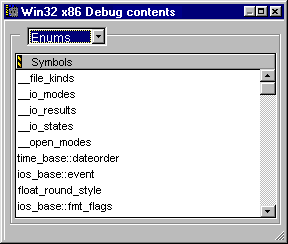
The items in this window are:
Category pop-up menu
The Category pop-up menu select the type of information displayed in the Symbols pane. The currently selected item is highlighted (Windows) or checked (Mac OS, Solaris, and Linux).
Symbols pane
The Symbols pane displays every item in the browser database that is a member of the currently selected category. The items are listed alphabetically.
 NOTE
NOTE
Routines are listed alphabetically by routine name, but the class name is displayed first. As a result, it may seem that the routines are not listed alphabetically.
[ First ] [ Previous ] [ Next ] [ Last ] [ Manuals ]
Visit the Metrowerks website at: http://www.metrowerks.com
For assistance contact Metrowerks Technical Support at: cw_support@metrowerks.com
Copyright © 2000, Metrowerks Corp. All rights reserved.
Last updated: August 17, 2000