[ First ] [ Previous ] [ Next ] [ Last ] [ Manuals ]
Log Window

The Log window (Figure 11.32) displays messages as your program makes calls to system DLLs or starts new tasks.
To use the Log window, you must enable the Log System Messages preference in the Debugger Settings preference panel. See "Debugger Settings" for more information.
 NOTE
NOTE
In Windows, log information includes messages about the loading and unloading of DLLs, as well as debug printf() messages. In the Mac OS, log information refers to messages about the loading of PowerPC code fragments, as well as DebugStr() messages.
Log Window: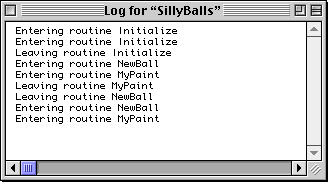
You can copy selected text from the Log window with the
Windows
If you choose to save the log to a text file, be sure to add the .txt extension to the file name, like this: log.txt
 TIP
TIP
(Mac OS) To learn how to print out the messages in the Log window, see Targeting Mac OS.
[ First ] [ Previous ] [ Next ] [ Last ] [ Manuals ]
Visit the Metrowerks website at: http://www.metrowerks.com
For assistance contact Metrowerks Technical Support at: cw_support@metrowerks.com
Copyright © 2000, Metrowerks Corp. All rights reserved.
Last updated: August 17, 2000