JavaDoc is a pre-linker that processes Java source code files, and uses the comments preceding classes, methods, etc. to generate HTML based documentation for the code. Since the JavaDoc pre-linker is integrated with the CodeWarrior IDE, it generates files much faster than the JavaSoft JavaDoc utility. The Java API documentation on your CodeWarrior CD was generated by this pre-linker.
There is one primary topic discussed in this section:
CodeWarrior implements JavaDoc as a pre-linker because of the batch nature of the JavaSoft compiler. The JavaSoft version of JavaDoc must be able to examine all compiled files simultaneously. In the current CodeWarrior plugin architecture, a compiler works on one file at a time, but linkers are able to work with all compiled files simultaneously. This is why JavaDoc is implemented as a pre-linker in CodeWarrior.
Another added benefit of implementing JavaDoc as a pre-linker is speed. Creating JavaDoc files should be the last thing you do with a Java project. Assuming this is true, the code will have already been compiled and tested. At this point, when the JavaDoc pre-linker is executed, the process is very fast since everything the pre-linker needs to know was already gathered at compile time.
Using JavaDoc is as simple as choosing the JavaDoc pre-linker, and compiling the files.
1. Choose pre-linker for JavaDoc target.
Choose Edit > TargetName Settings, where TargetName is the name of your current Java target. Choose
Target Settings from the list of settings panels on the left side of the window
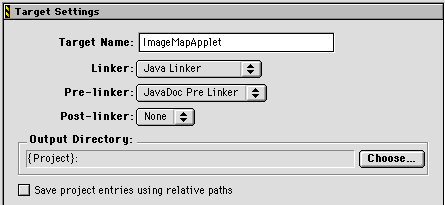
to display the Target Settings panel. Choose JavaDoc Pre Linker from the Pre-Linker pop-up menu in the Target Settings panel (Figure 8.1). Press Save to save changes. Close the Target Settings dialog box. Press
OK for subsequent warning dialogs.
2. Set JavaDoc Project options.
Choose the settings you wish to use for JavaDoc from the JavaDoc panel (Figure 8.2). For a full description of each setting in this panel, see "JavaDoc."
JavaDoc settings panel: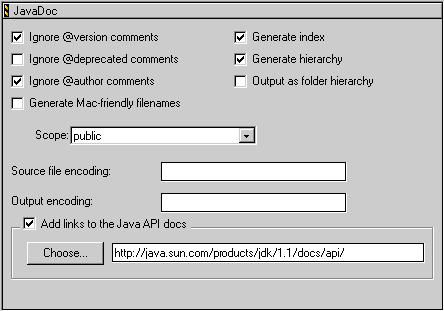
Compile the project.
Choose Project > Make. JavaDoc creates a new folder in the same folder as your project
called "Docs."
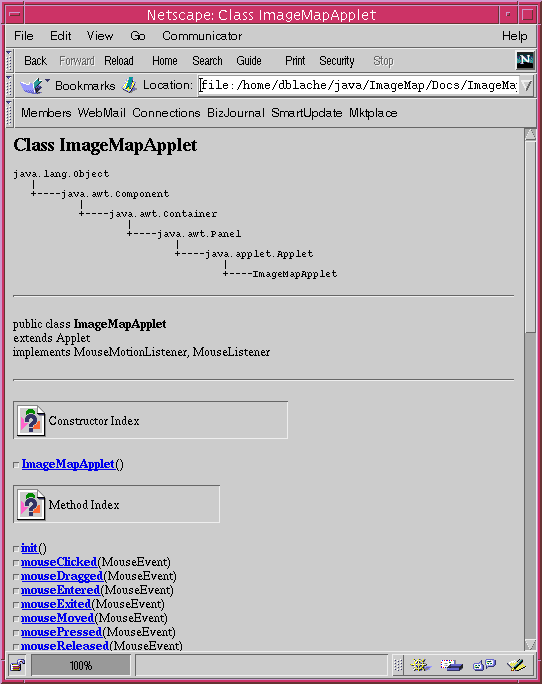
The last step is to open the HTML files in your preferred HTML Browser (Figure 8.3). A separate HTML file is generated for every public Java class included in the target. There are also some default files generated depending on the structure of your Java project.
You may find some links do not work. This is because your project does not include this information. For example, if your project does not include packages, the link to Packages.html fails because the file was not generated by JavaDoc.
The images used in the HTML documents are not automatically generated by JavaDoc, though the HTML source that references these images is generated. You may create your own images to use, use the images from the Java API documentation, or use the images supplied with your CodeWarrior installation. The images provided with the CodeWarrior installation are located in the following places:
Windows:
Metrowerks CodeWarrior\Java_Support\images
Macintosh:
Metrowerks CodeWarrior:Java_Support:images
Solaris:
Metrowerks CodeWarrior/Java_Support/images