This chapter discusses how to edit a string list resource with Constructor.
String lists, stored in an STR# resource, are a common feature of Mac OS code. Each STR# resource contains a series of text strings that are accessed by an index number. The index number represents the position of the string in the list.
String lists are not exclusive to PowerPlant. Constructor can edit STR# resources for any type of Mac OS code.
This chapter discusses how to manage and modify the contents of a string list resource. For information on how to create, copy, open, modify, and delete a string list resource as a whole, see "Managing Resources Overview."
The topics in this chapter are:
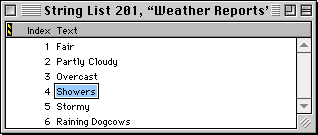
The editor window for string lists is very simple. It has two columns: the index number for the string, and the text for the string itself.
The string list editor is very simple. You may add, modify, move, or delete any string in the list.
To add a new string to a string list, choose the NewString item from the Edit menu.
Edit the string text just as you would any entry in Constructor. See "Text Editing."
To change the order of strings, drag the string to its new location and drop it.
To remove a string from the list, select it and: