[ First ] [ Previous ] [ Next ] [ Last ] [ Manuals ]
Seeing Window Controls

The toolbar at the top of the editor window contains a row of pop-up menus and controls. Click the Toolbar Disclosure Button, shown in Figure 5.1, to show or hide this toolbar.
If you hide the toolbar, the default pop-up menu controls appear along the bottom of the editor window, as shown in Figure 5.7. Note that the File Path Caption is not visible in this arrangement.
 NOTE
NOTE
If you hide a customized editor window toolbar, custom items do not appear at the bottom of the window. The default toolbar items always appear when the toolbar is hidden. After you show the toolbar again, the custom configuration re-appears. For information on configuring toolbars, see "Customizing Toolbars".
Pop-up Menus Along the Bottom of the Editor Window: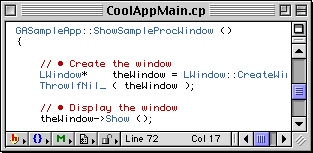
To show the toolbar along the top of the editor window again, click the Toolbar Disclosure Button once more.
You can choose a default setting to display or hide the toolbar in editor windows. To do so, see "Toolbar Disclosure Button" for more information. See also "Showing and hiding a toolbar."
[ First ] [ Previous ] [ Next ] [ Last ] [ Manuals ]
Visit the Metrowerks website at: http://www.metrowerks.com
For assistance contact Metrowerks Technical Support at: cw_support@metrowerks.com
Copyright © 2000, Metrowerks Corp. All rights reserved.
Last updated: August 17, 2000