[ First ] [ Previous ] [ Next ] [ Last ] [ Manuals ]
Window Buttons

There are several buttons in the Customize IDE Commands window that control how the IDE applies your settings.
This section discusses the following topics:
Discarding changes
If you change the settings in the Customize IDE Commands window and then try to close the window, the dialog box shown in Figure 8.31 appears. To discard your changes, click Don't Save. To keep your changes, click Save. To discard your changes and return to the Customize IDE Commands window, click Cancel.
Commands and Key Bindings Confirmation Dialog Box: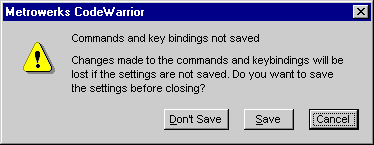
Factory Settings button
Click Factory Settings and then Save to revert the Customize IDE Commands window to its default settings.
 WARNING!
The IDE resets all settings to their default values after you click the Factory Settings button. If you do not export your customized command groups or menu commands before restoring the default settings, you will lose your customized items. See "Exporting commands and key bindings" for more information.
Revert Panel button
Click Revert Panel to undo the changes you made to the Customize IDE Commands window. Clicking this button resets the window to its last saved state.
Save button
Click Save to commit the current settings in the Customize IDE Commands window. After closing the window, the CodeWarrior IDE behaves according to the settings that you saved.
[ First ] [ Previous ] [ Next ] [ Last ] [ Manuals ]
Visit the Metrowerks website at: http://www.metrowerks.com
For assistance contact Metrowerks Technical Support at: cw_support@metrowerks.com
Copyright © 2000, Metrowerks Corp. All rights reserved.
Last updated: August 17, 2000