[ First ] [ Previous ] [ Next ] [ Last ] [ Manuals ]
Symbol Hint

As you debug source code, the debugger shows useful information about your program's variables. This information appears automatically as you move the cursor over particular variables in source-code views. For example, suppose you start a debugging session and examine your source code in the Source pane of the Thread window. If you rest the cursor over the variable i, as shown in Figure 11.17, the debugger displays the current value of that variable.
Symbol Hint: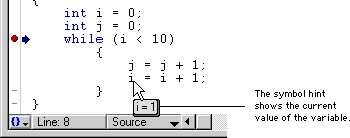
 NOTE
NOTE
The symbol hint is only available when the debugger is active. If you do not see information about your program's variables, you need to activate the debugger. For more information, see "Preparing for Debugging".
[ First ] [ Previous ] [ Next ] [ Last ] [ Manuals ]
Visit the Metrowerks website at: http://www.metrowerks.com
For assistance contact Metrowerks Technical Support at: cw_support@metrowerks.com
Copyright © 2000, Metrowerks Corp. All rights reserved.
Last updated: August 17, 2000