[ First ] [ Previous ] [ Next ] [ Last ] [ Manuals ]
Debugger Contextual Menu

The debugger includes a contextual menu (Figure 11.18) that provides convenient access to various debugging commands. Use one of the following techniques to display the contextual menu:
The debugger uses the context of the item you select to determine the commands that appear in the contextual menu. For example, if you choose a variable, the contextual menu includes commands for viewing the contents of that variable.
Debugger Contextual Menu: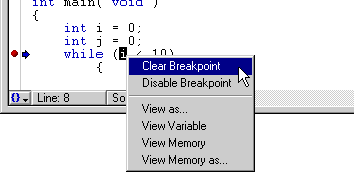
 TIP
TIP
The debugger contextual menu is useful in a variety of situations. For instance, you can use the contextual menu in the Variables pane and the General Registers window to view variables in different formats. You can also use the contextual menu in the Source pane to manipulate breakpoints and move the program counter. Experiment with the contextual menu to discover all of its features.
[ First ] [ Previous ] [ Next ] [ Last ] [ Manuals ]
Visit the Metrowerks website at: http://www.metrowerks.com
For assistance contact Metrowerks Technical Support at: cw_support@metrowerks.com
Copyright © 2000, Metrowerks Corp. All rights reserved.
Last updated: August 17, 2000