[ First ] [ Previous ] [ Next ] [ Last ] [ Manuals ]
Watchpoints Window

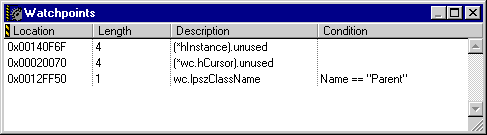
The Watchpoints window (Figure 11.26) lists the watchpoints in your current build target by memory address. To open the Watchpoints window, use one of the following techniques:
You can clear a watchpoint by selecting it and performing any of the following steps:
Choose Debug > Clear WatchpointEdit > DeleteEdit > ClearEdit > Clear
For more information, see "Watchpoints".
[ First ] [ Previous ] [ Next ] [ Last ] [ Manuals ]
Visit the Metrowerks website at: http://www.metrowerks.com
For assistance contact Metrowerks Technical Support at: cw_support@metrowerks.com
Copyright © 2000, Metrowerks Corp. All rights reserved.
Last updated: August 17, 2000