[ First ] [ Previous ] [ Next ] [ Last ] [ Manuals ]
Watchpoints

A watchpoint is a location or region of memory that you want the debugger to observe for you. Whenever a new value is written to that area of memory, the debugger suspends execution of the program and notifies you with an alert message on your screen (Figure 11.58). After dismissing the alert, you can examine the call chain, inspect or change variables, step through your code, or use any of the debugger's other facilities. (In particular, from the debugger level, you can change the contents of the location that triggered the watchpoint without triggering it again.) Use the Run command (or the Run button on the debugger toolbar) to continue execution from the watchpoint.
The following sections discuss watchpoints in more detail:
 NOTE
NOTE
(Mac OS) Watchpoints require System 7.5 or later, and will not work on 68K computers unless you enable virtual memory. Watchpoints are also known to be incompatible with the Speed Emulator portion of Speed Doubler, and possibly with RAM Doubler as well.
If you have a small program with a small set of global variables for 68K, the global data area is placed against the end of the stack. Since the debugger cannot detect watchpoints for variables on the stack, the global variables cannot be watched. One way to avoid this problem is to declare a global array of type char, about four kilobytes in size, to move the global variables away from the stack.
Watchpoint Alert: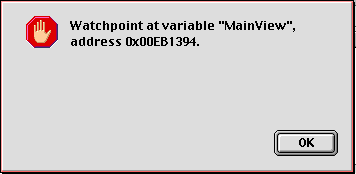
Setting and clearing watchpoints
You can set a watchpoint in any of the following ways:
Variables or memory locations on which a watchpoint has been set are underlined in red in the Variable and Memory windows. To learn how to change this default color, refer to the section "Text Colors".
 WARNING!
There are some significant restrictions on where in memory you can place a watchpoint. You can use watchpoints only on global variables or on objects allocated from your application heap. You cannot set a watchpoint on a stack-based local variable or on a variable being held in a register
Mac OS
You cannot set a watchpoint anywhere in low memory or the system heap. If you attempt to set a watchpoint in this area of memory, an alert box displays with the following text: "Could not set a watchpoint because the page containing that memory location overlaps low memory or the system heap."
NOTE
(Mac OS) When debugging small 68K projects, you might see an alert box with the following text when trying to set watchpoints on a global variable: "Could not set a watchpoint at that location because it is on the stack." This is a limitation of the classic 68K runtime architecture, not the debugger.
You can clear a watchpoint in any of the following ways:
¯ Choose Debug > Clear Watchpoint
¯ (Windows, Solaris, and Linux) Press Backspace, or choose Edit > Delete
¯ (Mac OS) Press Delete, or choose Edit > Clear
Invoke the debugger contextual menu for a selected watchpoint and choose the Clear Watchpoint command.
All watchpoints are automatically cleared after the debugger kills the program, or after the program's execution terminates.
You can manipulate watchpoints with the following commands in the Debug menu:
Enable Watchpoint-activates the watchpoint for the selected variable or memory range
Disable Watchpoint-de-activates the watchpoint for the selected variable or memory range
Clear All Watchpoints-removes all watchpoints from the current program
In addition, you can use the debugger contextual menu in source-code views and the Watchpoints window to choose the same menu commands. For more information, see "Debugger Contextual Menu".
Viewing watchpoints
To see a list of all watchpoints currently set in your program, open the Watchpoints window (Figure 11.59). Use one of the following techniques:
For more information, see "Watchpoints Window".
Displaying the Watchpoints Window: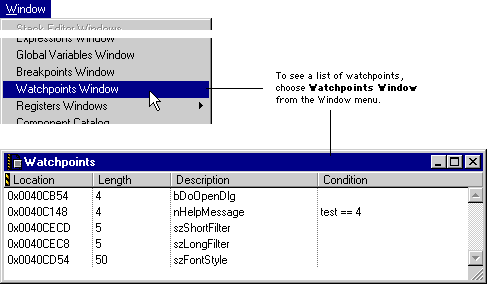
[ First ] [ Previous ] [ Next ] [ Last ] [ Manuals ]
Visit the Metrowerks website at: http://www.metrowerks.com
For assistance contact Metrowerks Technical Support at: cw_support@metrowerks.com
Copyright © 2000, Metrowerks Corp. All rights reserved.
Last updated: August 17, 2000