[ First ]  [ Previous ]  [ Next ]  [ Last ]  [ Manuals ]


Expressions Window

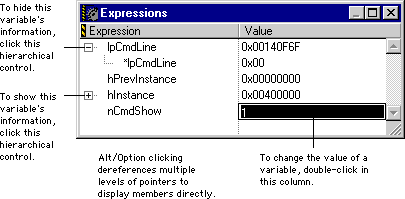
The Expressions window (Figure 11.23) provides a convenient location to place frequently used local variables, global variables, structure members, and array elements.

To open the Expressions window, use one of the following techniques:

Choose Data > Copy to Expression to add selected items to the Expressions window. Alternatively, select the same command from the debugger contextual menu (see "Debugger Contextual Menu"). You can also use the mouse to drag and drop items from other variable panes and windows into the Expressions window. To reorder items in the Expressions window, drag each item to its new position in the list.

Expressions Window:

To remove an item from the Expressions window, select the item and use one of the following techniques:


Windows

Press Delete, or choose Edit > Delete.


Mac OS

Press Delete, or choose Edit > Clear.


Solaris, and Linux

Press Backspace, or choose Edit > Clear.

Unlike local variables displayed in an ordinary Variables window, the IDE does not remove local variables in the Expressions window after execution exits the routines that define those local variables.

To learn about the Expressions window, refer to "Using the Expressions window".


[ First ]  [ Previous ]  [ Next ]  [ Last ]  [ Manuals ]

Visit the Metrowerks website at: http://www.metrowerks.com
For assistance contact Metrowerks Technical Support at: cw_support@metrowerks.com
Copyright © 2000, Metrowerks Corp. All rights reserved.

Last updated: August 17, 2000