This appendix covers all the utility classes in PowerPlant.
These utilities cover a wide range of services. Some of them are wrapper classes for various Toolbox managers. Others help you save and restore program state in one form or another. Still others provide significant help with common programming challenges like string manipulation, list management, or key filtering.
This appendix is organized by source file. While that might seem an odd way to structure a discussion of various utilities, this approach makes sense for two reasons. First, the PowerPlant designers put related tasks and classes into the same source file. As a result, the source files reflect functional boundaries in programming. Second, identifying the utilities by source file helps you find them more easily. Soon you'll be able to zip directly to the source file you need if you want to look up a function.
In most cases there is both a header file and a source file for each entry in this appendix. However, a single file may contain the declaration or definition for several classes.
The names for some of the more important "utility" classes begin with the letter L. Most utility classes begin with the letter U. In general, the "L" files are more central to PowerPlant and its code. The "U" files are a little more peripheral or limited in their scope. For example, LArray is used throughout PowerPlant for many purposes. UDesktop has specific functions for working with windows.
Finally, this appendix is not a replacement for the PowerPlant Reference. The appendix concentrates on how you use these utilities. Consult the PowerPlant Reference for complete information on the various data members and member functions in each class.
The classes and functions declared and defined in the following files have already been discussed elsewhere in the manual. Please refer to the appropriate section for information about them.
PowerPlant has many more utility classes designed to help with a wide variety of tasks. Some of these classes have been mentioned in passing. Others have not been mentioned at all. This appendix details the following classes:
LClipboard is a descendant of LAttachment. LClipboard is an independent PowerPlant class that can be used in non-PowerPlant projects. However, it does rely on the attachable/attachment design pattern. In typical practice, you'll use LClipboard along with the rest of PowerPlant.
LClipboard supports the global clipboard-the "scrap"-completely. It has all the functions for setting and getting data of arbitrary type and length on the scrap. If you want to implement a local clipboard for use within your application, you must subclass from LClipboard.
Table 15.6 lists the more significant LClipboard functions.
| Function |
Purpose |
|---|---|
To use LClipboard, you create one, and only one, instance of LClipboard.
The GetClipboard() function is static, so you can always get a pointer to the clipboard
object with LClipboard::GetClipboard().
Inside Macintosh:More Macintosh Toolbox for information on the Scrap Manager.
How you use LClipboard in your code depends greatly on your requirements. For example, do you want to import or export custom data for use with other applications? Do you only want to import or export standard data types (PICT, TEXT, MooV, and 3DMF) for use with other applications? Or do you only want a local clipboard (local scrap) for your own application use?
A global clipboard, or global scrap, allows you to share either standard or custom data between applications.
If you define an application-specific data type to be placed on
the global scrap, you need to subclass LClipboard and override
SetDataSelf() and GetDataSelf(). You also need to add some instance variables for storing the
custom data. For example, a pointer or handle to your data.
In SetDataSelf(), you store the data in your private storage. In GetDataSelf(), you retrieve the data from your private storage.
You attach the clipboard object to your application object as
shown in Listing 15.1. As an attachment, LClipboard looks for the msg_Event message. If a suspend or resume event occurs, LClipboard converts
the local clipboard to the scrap or vice versa, as appropriate.
It does so by calling ExportSelf() or ImportSelf() as appropriate.
Attaching LClipboard to your application's constructor:
...
// inside constructor for your application
// setup access to the global clipboard
AddAttachment( new CMyClipboard );
...
To be friendly, if your application's custom clipboard data type
can be converted to a standard type, such as TEXT, PICT, MooV,
or 3DMF, you need to override ExportSelf() and perform the data conversion in that method. If your application
can use standard format data copied from other applications, but
needs to convert that data to your custom type, you need to override
ImportSelf() to convert the data to your custom format. Both of these methods
are defined empty in LClipboard.
 TIP
TIP Generally, ImportSelf() would only set a variable saying there is data on the clipboard.
You only need to convert the data if the user chooses Paste.
An example may be useful here. Say you wrote that killer graphics
application. Your application has a custom storage mechanism for
your graphic data. Copy and Paste within your application is not a problem as no data conversion
is necessary. However, say a user copies a graph created in your
application. The user then switches to another application, maybe
a desktop publishing application that only understands the standard
clipboard data types, to paste the graph. Your application receives
a suspend event. At this time, the ExportSelf() method of your LClipboard class is called. You convert your custom
data into a format the other application understands in this method.
If you do not do this, the other application will not be able
to paste the graph.
Similarly, if the user copies a picture from one application and
want's to paste it into your graphics application, your application
is brought to the front and the ImportSelf() method of your LClipboard class is called. If it's more efficient
to convert the graphic to your custom format, you can convert
the data in this method or wait until the user actually chooses
Paste and do the conversion then.
If your application only handles the standard format data types, declare an LClipboard object as a member variable of your application subclass like this:
LClipboard mClipboard; // inside declaration of class CMyApp
LClipboard only supports the global clipboard. If you want to
maintain a local clipboard (local scrap) for use by your application
only, you need to subclass LClipboard and override GetDataSelf() and SetDataSelf() to use your local scrap instead of the global scrap.
To put data on the scrap, you call SetData() as shown in Listing 15.2. There are two overloaded versions of this function. One takes
a handle to data, the other a pointer and length of data. The
actual work is done by SetDataSelf(). The default implementation just puts data on the global scrap.
In derived classes using a private clipboard, you would override
SetDataSelf().
Putting text on the clipboard:
...
// Copy text to the clipboard. Note: clipString is a Pascal string
(LClipboard::GetClipboard())->SetData(`TEXT', &clipString[1],
		clipString[0]);
...
To retrieve data, you call GetData(). You provide a handle. This function fills the block with the
data from the scrap. The actual work is done by GetDataSelf(). The default implementation just puts data on the global scrap.
In derived classes using a private clipboard, you would override
GetDataSelf().
Arrays of data are common features of many applications. PowerPlant provides powerful array classes for your use. PowerPlant itself uses these classes in many places.
In PowerPlant the array classes can be organized into three groups: the arrays, the iterators, and the comparators. An array is an indexed series of values. An iterator lets you walk through the items in the array-forwards or backwards, from the beginning, the end, or from an arbitrary location in the array. A comparator is used to sort the contents of the array if you wish to keep the items sorted.
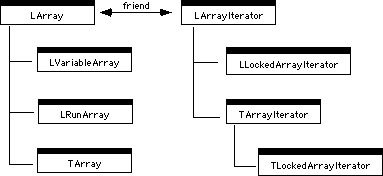
PowerPlant uses its own array classes to manage all kinds of lists of objects. Figure 15.6 shows the class hierarchy for the array classes.
LArray is the fundamental class for arrays. You can use LArray for an array of any kind of data, with an arbitrary number of items, as long as all items are the same size. LArray is dynamic, which means you can add or remove items from the array freely. LVariableArray allows you to create arrays where each element in the array may contain data of a different size.
LArray and LArrayIterator are each friend to the other. You can iterate over the array or list from an arbitrary starting position, either forward or backward. Iteration works properly even if items are added or removed from the list during iteration. The array iterator does the right thing even if the array disappears completely.
Using LComparator, you can keep the items in an array sorted.
 NOTE
NOTE In earlier versions of PowerPlant, the LList and LListIterator were used as simple implementations of arrays, as well as used internally within PowerPlant for list management. These classes are now obsolete, so you should update old code to use LArray (or some other appropriate array class). Any new needs for array classes should use LArray, LArrayIterator and their descendants.
long values
LArray implements an ordered collection of fixed-size items. Positions in the array are one-based-the first item is at index value 1. Index 0 is not an item in the array. The index value zero is used to indicate a nonexistent item.
Index values are signed, 32-bit integers. When specifying an item, you pass a pointer to the item data as a parameter. The array stores a copy of the data, or returns a copy of the data to you.
The size of each item in a particular LArray must be the same,
but the size can vary between instances of LArray. The actual
content of each item can be any type of data-pointers, handles,
structures, actual values, and so forth. The only data you should
not store in an array (LArray or otherwise) is an object. You
should store pointers to objects created via new(). One other limitation, specific to LArray, is that each item
must use the same amount of storage. You specify the amount of
storage per item in the LArray constructor.
Table 15.7 lists some of the functions in LArray.
| Function |
Purpose |
|---|---|
You can insert, remove, get a value, assign a value, swap, move items, and get data about the array. There are many more functions in the LArray class. You should consult the source code for details.
NOTE You cannot store C++ objects in an array. PowerPlant arrays store data using Handles which allow items to move in memory. C++ objects must stay at the same place in memory. Internally, C++ objects store pointers to their various subparts. These pointers are absolute, not relative, so moving the object would produce unpredictable results.
PowerPlant defines the constants index_First and index_Last so you can easily insert or remove items at the beginning or
end of an array. If you attempt to insert an item beyond the current
end of the array, PowerPlant inserts the item at the end of the
array. If you attempt to remove an item that doesn't exist, PowerPlant
does nothing.
The FetchItemAt() function has two versions. In one, you specify the size of the
data you want returned. You can use this to retrieve partial data
from any array element, or control the amount of data returned
from an LVariableArray. In typical use you do not need to specify the size of the data.
 WARNING!
 When fetching data from an array, PowerPlant copies the data into a buffer you provide. PowerPlant assumes that the data buffer is large enough to hold the requested data. If it is not large enough, you can expect unexpected results. If you specify a size for the returned data, PowerPlant returns either that amount of data or the actual data in the element, whichever is smaller.
The functions InsertItemsAt() and AssignItemsAt() also have a default parameter you can use to specify the data
size. This allows the same function to work for all arrays, including
those with variable size data. If you are working with LVariableArray,
specify the size of the data. Otherwise, pass zero or let it default
to zero. You should not specify a size when working with LArray
or LRunArray, both of which are arrays with data of one size.
If you specify a size of zero, LArray gets the actual size and
uses it.
WARNING! When using InsertItemsAt(), or AssignItemsAt() with LVariableArray, you must specify the size of the data. If
you are working with LArray or LRunArray, do not specify the data
size.
In typical use, you instantiate an array of items of the desired
size. As you add or remove items from the list, you call Insert-ItemsAt() or RemoveItemsAt(). These functions take care of notifying any array iterators of
changes in the array. When you want to retrieve an item, you call
FetchItemAt() with the desired index value.
To create a sorted array, you create an LComparator object before creating the array. Then pass a pointer to the
LComparator object to the LArray constructor. Or you can use SetComparator() to specify an arrays comparator after the fact.
To iterate over an array, you create an iterator object. You pass a pointer to the array to the iterator constructor, so it knows what array to work with.
LVariableArray is an implementation of LArray that allows you to store data of differing sizes in an array. It overrides several member functions of LArray to implement data storage and retrieval in a situation where array elements vary in size. It also implements a few new functions (all of them internal).
The public interface for LVariableArray is effectively identical to that of LArray. The tasks you need to perform-setting, getting, adding, and removing items in the array-you accomplish by making the same calls you would with an LArray object.
WARNING! When using InsertItemsAt(), or AssignItemsAt() with LVariableArray, you must specify the size of the data.
When calling FetchItemAt() with LVariableArray, you may wish to specify the size of the
data returned if you don't want it all, or you want to ensure
that the data returned does not overrun your buffer.
LRunArray is an implementation of LArray in which a contiguous series of identical items (a run of items) is stored once. It overrides several member functions of LArray to implement data storage and retrieval in a situation where a run of array elements is stored in a single element. It also implements a few new functions (all of them internal). You could use LRunArray to save memory in a situation where you could expect to have runs of data.
The public interface for LRunArray is effectively identical to that of LArray. The tasks you need to perform-setting, getting, adding, and removing items in the array-you accomplish by making the same calls you would with an LArray object.
You do not need to keep track of the true index number in the run array. For example, if the first 16 items in an LRunArray are identical, and the 17th is not, the first element in the array holds the data for items 1-16, and the second element in the array holds item 17. However, you deal with the array as if each item occupied a separate element. So you access the 17th item in the array with the index number 17, even though the first 16 items are identical, and therefore stored in a single element.
TArray is a template-based implementation of LArray. TArray is a subclass of LArray. All functions are one-line inlines that call the corresponding LArray method.
Even though TArray is a template class, it is not that different,
in terms of usage, from LArray. The bonus of using TArray of LArray
is that the template implicitly or explicitly performs all the
typecasts to and from the void* pointers used by LArray. This means that code which uses the
template is typesafe.
Furthermore, TArray accepts its arguments as references, unlike LArray which accepts its arguments as pointers.
One caveat to using TArray is that instantiating your TArray will
cause inherited virtual functions to be hidden. The compiler will
generate a warning about this if you have the "Hidden Virtual
Functions" warning turned on. There is no problem doing this.
However, to suppress the warning, you can wrap the declaration
of the TArray with #pragma warn_hidevirutal off/reset.
All of PowerPlant's internal array usage utilizes TArray.
The C Compilers Reference, and Assembler Guide for more information
on #pragma's, and the IDE User Guide for more information on warning messages.
LArrayIterator provides the functionality necessary to walk through an array from an arbitrary starting point, going either forward or backward. Each LArrayIterator object is associated with a single array. An array may have an arbitrary number of iterators, but each iterator has one array.
Rather than use an LArrayIterator, you could walk through the
array contents directly. You could call the array's FetchItemAt() function and loop through each item. This works fine as long
as the number of elements in the array doesn't change.
The iterator is much more robust. The design of LArrayIterator allows for the length of the array to change while iterating, and even for the array to disappear completely. This safety mechanism works as long as you always notify the iterator when the underlying array changes. The implementation of LArray in PowerPlant does this for you.
You can use simple functions in LArrayIterator to traverse the array. LArrayIterator keeps an index value or marker that refers to the current item in the array. Table 15.8 lists the functions of interest.
LArrayIterator functions for walking a list:
| Function |
Purpose |
|---|---|
If you step past the end of the list, the Next() function returns false. If you step before the beginning of the list, the Previous() functions return false.
LArrayIterator has two versions of Current(), Next(), and Previous(). In one version you specify the size of the data you want returned.
This is useful if you want only part of the data returned, or
with data of varying size. If you are working with LArray or LRunArray,
and not using LVariableArray, you typically do not specify a size.
To use an array iterator, you start with the iterator constructor.
You specify the array object to which the iterator should be attached,
and you set the initial value for the index marker. You can use
the constants from_Start or from_End, or you may specify an exact index number. You can call ResetTo() to set the marker at any time.
If you iterate from_Start, the marker is set to non-existent item zero. Call Next() to get the first item in the array. Conversely, if you iterate
from_End, call Previous() to get the last item. Listing 15.3 shows you how to iterate from the start to the end of an array.
Iterating from the start of an array:
{
  // Iterating from beginning to end of myArray
  LArrayIterator iterator(myArray,LArrayIterator::from_Start);
  while (iterator.Next(&theItem))
  {
    // do something with theItem
  }
}
Remember that the iterator is a separate class from the array. You can have multiple iterators for the same array. For example, Listing 15.4 shows how to remove duplicate entries from an array using two iterators simultaneously on the same array.
Multiple iterators for a single array:
{
  LArrayIterator outer(myArray, LArrayIterator::from_Start);
  while (outer.Next(&testItem)) {
    LArrayIterator searcher(myArray,
                           myArray->FetchIndexOf(&testItem));
    while (searcher.Next(&searchItem)) {
      if (testItem == searchItem) {
        myArray->Remove(searchItem);
      }
    }
  }
}
The outer iterator starts from the beginning of the array. The searcher iterator starts after the position of the current item in the outer iterator and removes any item that matches that item. Each iterator moves properly to the next item in the array, even when an item is removed.
The PowerPlant source code is replete with examples of arrays and array iterators. Browse the code to see how it's done. Specifically, the "LArray Demo," located on the CodeWarrior Reference CD, demonstrates the basics of how to use the array classes.
LLockedArrayIterator is a subclass of LArrayIterator that locks the array before traversing it. This is useful when accessing pointers to items in arrays that do not change while iterating, or any time you might otherwise need to lock an array.
Usage of LLockedArrayIterator is no different than using an LArrayIterator. Since it is the constructor that locks the array and the destructor that unlocks it, gaining the benefits of LLockedArrayIterator is seamless.
NOTE Since the locking and unlocking occur in the constructor and destructor, you need to ensure the LLockedArrayIterator is destroyed before its associated array is destroyed. If you create the LLockedArrayIterator on the stack, you can simply use braces to limit the scope and life of the LLockedArrayIterator object.
TArrayIterator is a template-based implementation of LArrayIterator.
TArrayIterator is a subclass of LArrayIterator. The entire class
is declared as inlines in TArrayIterator.h.
TArrayIterator is to LArrayIterator as TArray is to LArray. The relationships are analogous. It is typesafe, and uses references instead of pointers.
TArrayIterator is used throughout PowerPlant itself. Reading the source code will show how to utilize the class. Specifically, the "LArray Demo" on the CodeWarrior Reference CD demonstrates how to use this class.
TLockedArrayIterator is a subclass of TArrayIterator. It functions the same as TArrayIterator as well as mirroring the same locking functionality of LLockedArrayIterator.
LComparator is a simple class. LComparator objects know how to compare two objects or structures. LComparator has four member functions.
| Function |
Purpose |
|---|---|
The Compare() function should return a value less than zero if item 1 is less
than item 2, zero if they are the same, and greater than zero
if item 1 is greater than item 2. CompareToKey() should do the same against the key value. CompareToKey() is not implemented. If you wish to compare against a key, you
must override LComparator.
LComparator does a byte-level comparison. It uses the BlockCompare() function defined in UMemoryManager.cp to do the work.
To create a sorted array, you first create an LComparator object. You then pass a comparator pointer to the array constructor. PowerPlant takes care of the rest. It keeps the array sorted as you insert new items. Removing items does not affect sorting.
The "LArray Demo" on the CodeWarrior Reference CD demonstrates how to use LComparator.
LLongComparator is a subclass of LComparator. It assumes that
the items being compared are long values. LLongComparator overrides Compare() and IsEqualTo(). However, you use LLongComparator exactly as you would LComparator.
LLongComparator is declared in LComparator.h and defined in LComparator.cp.
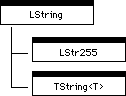
The LString class implements string functionality for Pascal-style strings. It serves as a base class for two PowerPlant string classes, LStr255 and TString. Figure 15.7 illustrates the class hierarchy.
TString is a template class. You can use it as a basis for a string of any type (an array of unsigned chars). LStr255 is a Pascal-style string with a maximum of 255 characters.
Use the PowerPlant Reference to get details on these string classes and their functions. LString is a powerful class with many features.
LString has functions or operators to:
¯ a substring of another string
¯ a four-character code (e.g. an OSType)
Find a substring within a string, including functions to start
from either end, or determine if the string begins or ends with
a specified substring. Insert, remove, or replace parts of the string. Compare strings. Compare strings with overloaded operators ==, !=, >, <, >=, and <= Copy a string. Copy a string with overloaded operator=. Append strings. Append strings using overloaded operators + and +=.
If you are going to do significant work with strings, examine the PowerPlant LString class and its descendants. These classes are independent of the rest of PowerPlant and can be used without any other PowerPlant classes.
NOTE LString replaces the functions found in the now-obsolete String_Utils file. You can use String_Utils for some simple work. There are functions to copy or concatenate Pascal strings. There are also functions to convert between a Pascal string and an OSType (four-character code).
LSharable is a mix-in class to allow objects to delete themselves when no longer used. LSharable uses a reference counter to keep track of the number of objects currently using the shared data. Once the counter reaches zero, the class deletes itself, thus freeing up any memory that was used by the object.
An example of where you might use LSharable is a database application where you may have several different views of the same shared data object. Once the last view no longer needs to see the data, the data object deletes itself.
PowerPlant uses UScreenPort on certain occasions to manage the desktop. This class creates a GrafPort that is the same size as the gray region-the area of all monitors, excluding the menu bar. If the port hasn't been created when you try to access it, the class creates the port automatically.
The UDrawingState files declare and define several PowerPlant utility classes. One of them is UQDGlobals.
The UQDGlobals class has four functions, listed in Table 15.10.
| Function |
Purpose |
|---|---|
The remaining classes in UDrawingState are designed to preserve and restore drawing state information. To use any of these classes, you simply define a local, stack-based object of the class. The constructor preserves the information. When the function goes out of scope, the class destructor is automatically called. The destructor restores the original state.
Using these classes makes saving your drawing state virtually automatic and foolproof. Even if the function terminates abnormally-for example, because of an exception-the correct destructor is called and state is restored. Table 15.11 lists each of these classes, and the data they preserve and restore.
Stack-based drawing state classes:
| Class |
Preserves/Restores |
|---|---|
Most of these classes also have a Normalize() function to set the values for that class's data to default values.
For example, the StColorState::Normalize() function sets the foreground color to black and the background
color to white.
The StClipRgnState class has additional constructors for setting a new clipping region, and for other clip region manipulations. Browse the PowerPlant source code to see these classes in action. Use the PowerPlant Reference to learn more about them. None of these classes is dependent upon PowerPlant. You can use these classes in any C++ code you write.
The UDrawingUtils files declare and define four classes, each related in some way to drawing. We'll discuss each class in turn. They are:
UDrawingUtils declares three static functions. Because every function is static, you never declare an object of this class. The class is simply a device for grouping these functions. Table 15.12 lists them.
| Function |
Purpose |
|---|---|
You may find these functions useful when drawing. None of them is dependent upon any other part of PowerPlant.
The StDeviceLoop class is designed to assist you when drawing items that are color-depth-sensitive on multiple monitors.
Like other stack-based classes, you declare a local object of
the class. Typically you would do this in a pane's DrawSelf() routine. However, the implementation is not pane-dependent. You
can use this class independently of PowerPlant.
The constructor takes a Rect in the local coordinates of the current port. Typically, this
would be the pane's frame.
The NextDepth() function passes back the depth of the next device and returns
true. After reaching the last device, the depth is zero and the
function returns false. You would normally call NextDepth() as the condition in a "while" loop.
When NextDepth() returns with a valid depth, it has already set the clipping region
to the intersection of the specified Rect, the current device, and the original clipping region. Therefore,
you can just draw the pane and rely on the clipping region to
properly restrict the drawing. If you need access to the current
device, you can call the GetCurrentDevice() member function.
The destructor restores the clipping region to what it was when the constructor was called.
Listing 15.5 shows some example code using StDeviceLoop.
A typical use of StDeviceLoop:
Rect  frame;
if (CalcLocalFrameRect(frame)) {
  StDeviceLoop theLoop(frame);
  SInt16 depth;
  while (theLoop.NextDepth(depth)) {
    switch (depth) {
      case 1: // Black & white
        break;

      case 4: // 16 colors
        break;

      case 8: // 256 colors
        break;

      case 16: // Thousands of colors
        break;

      case 32: // Millions of colors
        break;
    }
  }
}
You supply the appropriate drawing code for the different color depths.
The UMarchingAnts class provides some support for a standard Macintosh animated selection marquee. All of the members of this class are static, so you do not have to instantiate an object of this class.
The UMarchingAnts::BeginMarch() function sets up a pen pattern for the marquee. UMarchingAnts::EndMarch() cleans up. In between you are responsible for managing the marquee-erasing,
resizing, and drawing the marquee as the mouse moves.
The UTextDrawing class has a single static member function, DrawWithJustification(). PowerPlant uses this function to draw text in LCaption and LTextButton
objects.
DrawWithJustification() provides the same functionality as the Toolbox TextBox() routine, with one exception. The PowerPlant function does not
erase the box before drawing. This enhances performance.
However, if you change the text in a caption or text button dynamically, you must erase the text yourself before drawing the new text.
The UKeyFilters class defines three different key filters. Every function in this class is static, so you never have to declare a UKeyFilter object. You can use the functions at any time. Even better, UKeyFilters is another independent PowerPlant module that you can use in any project.
In PowerPlant, a key filter examines a keydown event and returns a value to you that tells you something about the key. You can then act based upon the value you receive from the filter. The filter is an automatic way of testing a key to see if it fits certain criteria.
The return value from each filter is an enumerated data type,
EKeyStatus. The possible EKeyStatus values are summarized in Table 15.13.
| Constant |
Meaning |
|---|---|
Each call to a filter returns one of these values depending upon the character in the event record. The filter doesn't tell you precisely what key is in the event. It does tell you whether the key passes the filter, something about the nature of the key, or what to do with the key.
The UKeyFilters class includes three key filters.
| Function |
Allows |
|---|---|
A "printing character" is a character with an ASCII value from 32 to 126. Each of these functions is static.
You can use Constructor to assign one of these three key filters
to an LEditField object. You can set a key filter at runtime using
LEditField::SetKeyFilter(). You provide a function pointer to the static filter function.
This mechanism allows you to create and use your own filter functions
in a class derived from UKeyFilters. When you create an LEditField
object, you call SetKeyFilter() to attach the desired filter to the object.
The three PowerPlant filter functions rely on several lower-level routines to process characters. You can use these functions directly for "quick and dirty" character testing, or as utilities in your own key filter. Table 15.15 summarizes the available functions.
UKeyFilters character testing functions:
| Function |
Identifies |
|---|---|
The IsCmdPeriod() function supports international keyboards.
You can find character-related constants declared in the PP_KeyCodes.h file.
The UProfiler files declare and define one class, StProfileSection. This is a simple, stack-based utility class to facilitate profiling a section of code using the CodeWarrior Profiler. UProfiler is an independent PowerPlant module that you can use in any project.
To use StProfileSection, you must have the project preferences set up for profiling, and the correct Profiler library included in the project. If you are set up for profiling, StProfileSection makes profiling extremely simple.
StProfileSection has two functions-a constructor and a destructor. Define a local StProfileSection variable before making the function call you want to profile. You provide a file name for the profiler's dump file, the number of functions to be profiled, and the expected stack depth (the nesting depth of function calls). The constructor initializes and activates the Profiler.
You can profile an entire application by creating the StProfileSection
object in the main() function before telling the application to run.
When your StProfileSection object goes out of scope, the destructor automatically dumps results to the Profiler dump file. You would then use the Profiler to view the results. Please read the Profiler Manual for details.
the CodeWarrior Profiler Manual for details on setting up a project for Profiling and the PowerPlant Advanced Topics chapter on profiling PowerPlant code.
PowerPlant uses this class internally to build pane objects from a PPob resource. In typical PowerPlant programming, you don't have to deal with this class at all, with one exception.
The UReanimator::LinkListenerToControls() function connects a listener to the controls in a RidL resource.
"RidL Resource" and "Linking broadcasters to listeners."
The UResourceManager files declare and define three stack-based classes for managing resources. UResourceManager is an independent PowerPlant module that you can use in any project. To use it, the only other PowerPlant files you need are the UMemoryMgr files.
We'll discuss each class in turn. They are:
You should also review the discussion of the StResource class described in "Stack-based memory classes."
You use StNewResource to create a new resource, or modify an existing resource.
Like other stack-based classes, you instantiate a local object. The constructor gets the handle to the existing resource, if it exists. Otherwise it allocates a new handle for you.
After you create the object, you modify the pre-existing resource or write new data into the handle provided for you by StNewResource.
When the local object goes out of scope, the destructor writes the resource to the resource fork, and releases the handle.
You use StDeleteResource to remove a resource from the resource fork of a file. The constructor gets the resource handle for the specified resource. The destructor removes the resource from the file and releases the resource handle.
You use StResLoad to preserve, change, and restore the ResLoad parameter in low memory. Typically you would do this to turn ResLoad off temporarily, then restore ResLoad when your operation is complete.
The UTextTraits class provides support for managing the appearance of text. The UTextTraits class is a fairly independent PowerPlant module. It requires UEnvironment and UMemoryMgr.
All of the functions in UTextTraits are static. You never instantiate a UTextTraits object. You can use the functions at any time.
PowerPlant declares a TextTraitsRecord to store the following text characteristics:
The font number is determined from the font name at runtime.
The same information may be stored in a Txtr resource. You can
use UTextTraits to work with either a Txtr resource, or with a
TextTraitsRecord in memory. Table 15.16 lists all the UTextTraits functions.
| Function |
Purpose |
|---|---|
Except for LoadSystemTraits(), there are two overloaded versions of each of these functions:
one for working with a TextTraitsRecord; the other for working with a Txtr resource.
When you initialize a TextTraitsRecord in memory, set all the values directly-including the font name.
However, set the font number to UTextTraits::fontNumber_Unknown. This is the value -1. Then call LoadTextTraits(). This function looks up the font number for the named font.
If you are working with a Txtr resource, call LoadTextTraits(). It reads the resource and (assuming you saved the resource with
the value -1 as font number) gets the font number for the named
font. It puts the results in a handle-based TextTraitsRecord.
See the PowerPlant Reference and source code for details about these and other UTextTraits functions.